Why You Should Avoid Adding Full Tables to Your Dataverse Solutions

When working with Dataverse solutions, it’s easy to fall into the habit of adding entire tables “just to be safe.” However, this practice can introduce unintended side effects, some of which only surface later as dependency issues during deployments.

Why Adding Only Changed Components Matters

When Microsoft introduces updates to Dataverse, such as new columns or relationships, those components are automatically pulled into any solution that contains the full table objects. This can lead to unexpected dependencies, even if your team didn’t explicitly change anything.

A Common Dependency Pitfall

One common scenario occurs when Microsoft adds a new relationship between Case and Contact.

If your solution includes the full Contact table but does not include the Case table, Dataverse will still bring in the new relationship metadata. During import, this results in a dependency error because the solution now references Case, even though Case itself isn’t part of the solution.

These issues are often confusing, time-consuming to troubleshoot, and completely avoidable.

The Fix, and the Best Practice

To resolve the issue, remove the Account and Contact tables from your solution and re-add only the specific components that were changed and actually required. Do this every time you have to add new components in the solution.

This approach ensures:

  • Cleaner and smaller solutions
  • Fewer unintended dependencies
  • Safer deployments across environments
  • Less risk from future Microsoft platform updates

It’s important to note that this best practice applies to all tables, not just Account and Contact.

Key Takeaway

✅ Add only what you change
🚫 Avoid adding full table objects unless absolutely necessary

The How?

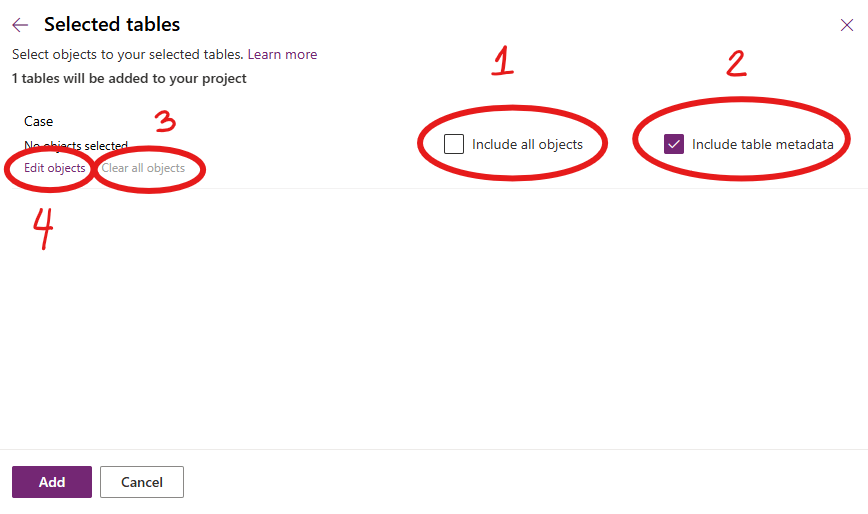
1. Ensure “include all objects” is unchecked
2. Ensure “include table metadata” is checked
3. Clear all objects (Important!)
4. Edit objects to select only the item you want to be included in the solution
Following this principle keeps our solutions stable, predictable, and easier to maintain, especially as Dataverse continues to evolve. Please don’t dig in or take shortcuts here; decisions like this have a ripple effect that impacts the entire team.

Power Apps Community Plan has been rebranded as the Power Apps Developer Plan

If you have not heard yet, you can actually have a free development environment to build and test with Power Apps, Power Automate, and Microsoft Dataverse.

In the Microsoft Learn article, it explains that this plan enables you to:

  • Create apps and flows without writing code, with full-featured Power Apps and Power Automate development tools. Easily share and collaborate on these solutions with others.
  • Connect to any data source by using 400+ out of the box connectors or by creating your own custom connectors.
  • Use a fully managed, scalable data platform with Dataverse, including support for common business application actions. Use out-of-the-box common tables or build your own data schema.
  • Export the solutions you create in your developer environment, and publish them on Microsoft AppSource so your customers can test-drive them.

For more information, please check out Microsoft Learn. Enjoy learning!

How To: Microsoft Dataverse Security

Hello everyone! I hope everyone is having a great first day of the year!

I am very excited to announce that I have finally created a Youtube channel called “Coffee & Technology”. Yes, because these are two of my favorite things. 😀

This channel is dedicated to Dynamics 365 and the Power Platform community. I created this channel to share with you how you can leverage out of the box features of Dynamics 365 and share with you some tips and tricks I learned in the past few years.

In the first episode, I will show you how Dataverse Security can adapt to many business scenarios.

I hope you find this helpful and if it did, please don’t forget to like this video, share and subscribe.

Cheers to new hope, new chance! May we have a wonderful 2022!

PS: If you have any business scenarios you need help on and would like me to do a video of, please feel free to reach out. 🙂

Improved Custom Recurring Tasks in Dataverse

Hi there! I have been receiving a few emails regarding my previous post about Custom Recurring Tasks. I read my post and realized that there are missing pieces in there. I probably left it like that to invite discussions and questions. Well, after more than a year, here we are and we got a few inquiries on the solution.

I tested the recurring feature of appointments and use that concept to re-create my Recurring Tasks solution.

I used the same UI section but I kind of optimized the Power Automate. Instead of 2 cloud flows, I kept it to one and use SWITCH to separate the daily vs weekly reoccurrence.

Here is how it looks now:

And to save you time, you can explore the solution by downloading it here. Have fun!

WHAT TO DO WHEN D365 DATA IMPORT DOES NOT WORK?

It gets frustrating when you are in a rush and D365 features does not work as expected for some reasons.

I usually try ALL the workaround first before opening a new ticket to Microsoft support. I want to make sure I have tried different ways and gather all useful information that I can share with Microsoft in case I needed to report an issue. This is also the best way to ensure that we can resolve an issue together as quickly as possible. Because, we are a team! Right?

Anyhow, I wanted to share something with you that I have used when Data Import get stuck in submitted status for some reasons. Usually, the first thing you look into is if the CRM environment is in Administration Mode. If YES, then turning it off should fixed the issue.

However, what do you do if its disabled but still getting this issue? (argh!) Open a Microsoft ticket! Right! But here is another thing that you can use.

Look into XRMToolbox. It usually have a lot of useful administration tool that can help and of course, Data Migration Tool. My goal is to import the same data I have in DEV to a UAT environment to ensure that I have the same GUID in all CRM environments. But why the same GUID, I’ll talk more of that some other time.

Data Migration Tool – I have been using this tool for years but did not realize that it has a filtering capability! I might be late on this but here is how you can use it.

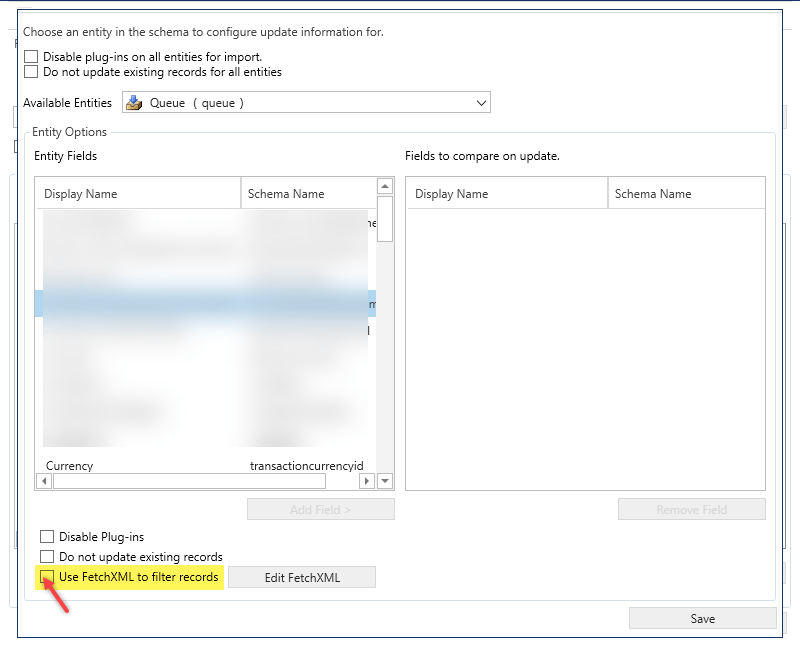
When you create a schema and selected the entity you want to import, go to Tools > Configure Import Settings.

Then at the bottom, check User FetchXML to filter records.

Now, you cannot use the whole fetchxml format, you need to remove the output-format and just keep the filtering tags, like this:

Save and you are good to go! I hope this helps and follow me for more tips! Stay safe, everyone!

Rich Text Editor is live #2020wave2

Hey folks! How are you?

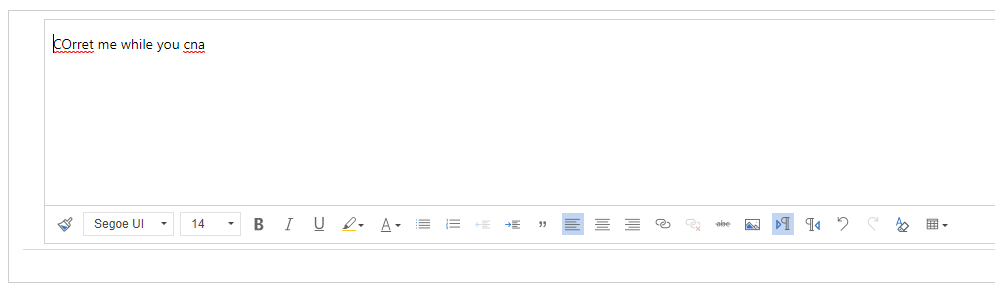
I just found out that the free 3rd party rich text editor that we have been using in Dynamics 365 for multiline of text removed its Spell Check feature but guess what???

Dynamics 365 has new Rich Text Editor PCF control and it looks awesome! Check it out!

Recurring Tasks in Dynamics 365 using Power Automate #lesscode

In Dynamics 365, Appointment Activity has recurrence feature. But what if business has a requirement to have the same functionality when using a Task Activity, like specifying a recurring pattern & dates?

Today I will share with you a simple approach on how you can create a custom recurrence feature in Task Activity using the power of Power Automate.

I used Custom Fields, a Workflow & 2 Power Automate Flows. I also used workflow extension from a Dynamics 365 Workflow Hero, Jason Lattimer.

I added a few more custom fields to hold daily & weekly count for doing a loop in Power Automate.

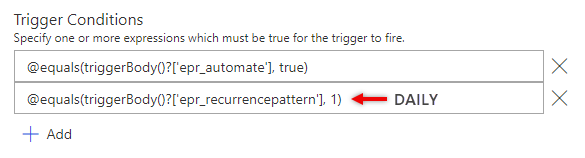
Then I created a Two Option field called “Automate” that I can use on my Trigger Condition.

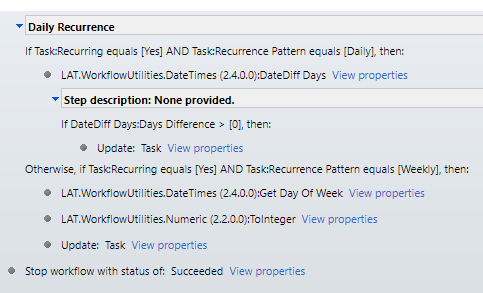
Daily Recurring

At the end, I make sure I decrement the Count just how we do it when writing codes. Then for weekly recurrence, I used Date Time connector – “Add a Time” and set it to add 1 Week.

And there you have it, a simple & working recurring task feature for your Task Activities.

I hope this is helpful. Let me know if you want to see the whole solution. Feel free to message me and I will send it straight to your mailbox.

Stay safe, everyone.

How to Create a Survey or Quiz Form for your Team? #office365 #microsoftforms

Did you know that there is an easy way to create a survey form or a quiz to send it to your employees or team inside or outside your organization?

Microsoft Forms can be shared in public as long as you don’t use the File Upload type. File Upload type is for internal members of your organization’s use only.

Responses are also available in real-time so you can review the results in no time just as how quickly you created it. Plus, it can be easily integrated with Dynamics 365 using Power Automate. 😉

I created this DEMO QUIZ in minutes showcasing the different types of control you can leverage from it. Feel free to try it and let me know how you feel about it.

If you have Office 365 license, you can try it by going to https://forms.office.com/.

Have fun!

Create a website or blog at WordPress.com

Up ↑