
When working with Dataverse solutions, it’s easy to fall into the habit of adding entire tables “just to be safe.” However, this practice can introduce unintended side effects, some of which only surface later as dependency issues during deployments.
Why Adding Only Changed Components Matters
When Microsoft introduces updates to Dataverse, such as new columns or relationships, those components are automatically pulled into any solution that contains the full table objects. This can lead to unexpected dependencies, even if your team didn’t explicitly change anything.
A Common Dependency Pitfall
One common scenario occurs when Microsoft adds a new relationship between Case and Contact.
If your solution includes the full Contact table but does not include the Case table, Dataverse will still bring in the new relationship metadata. During import, this results in a dependency error because the solution now references Case, even though Case itself isn’t part of the solution.
These issues are often confusing, time-consuming to troubleshoot, and completely avoidable.
The Fix, and the Best Practice
To resolve the issue, remove the Account and Contact tables from your solution and re-add only the specific components that were changed and actually required. Do this every time you have to add new components in the solution.
This approach ensures:
- Cleaner and smaller solutions
- Fewer unintended dependencies
- Safer deployments across environments
- Less risk from future Microsoft platform updates
It’s important to note that this best practice applies to all tables, not just Account and Contact.
Key Takeaway
✅ Add only what you change
🚫 Avoid adding full table objects unless absolutely necessary
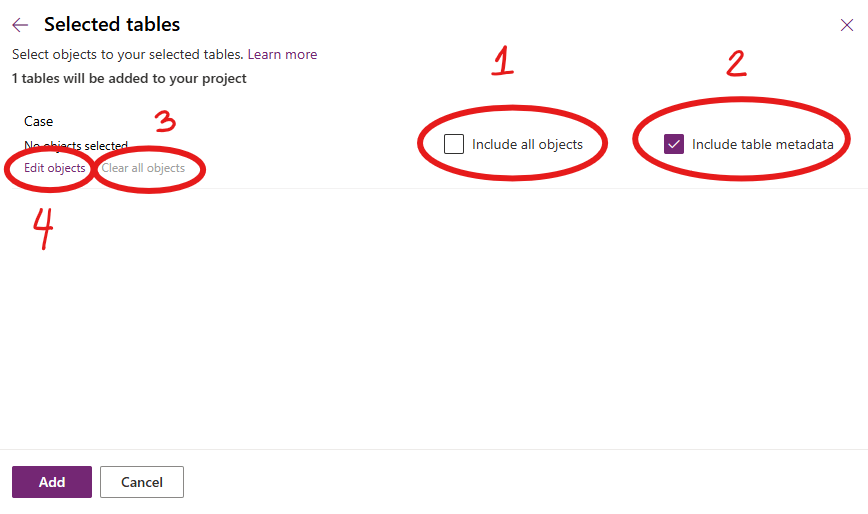
The How?
1. Ensure “include all objects” is unchecked
2. Ensure “include table metadata” is checked
3. Clear all objects (Important!)
4. Edit objects to select only the item you want to be included in the solution
Following this principle keeps our solutions stable, predictable, and easier to maintain, especially as Dataverse continues to evolve. Please don’t dig in or take shortcuts here; decisions like this have a ripple effect that impacts the entire team.

 Lyrio Cristall