
Here is another tutorial for you.
The requirement is to add a ribbon button so a Customer Service Agent can easily create a Phone Call with minimal clicks in the Unified Client Interface of Dynamics 365. We will also auto-populate the values in the Phone Call form.
Step 1: Create a web resource js file where you will write the custom script to open the quick create phone call form.
Step 2: Add a custom ribbon button in the Contact form using the Ribbon Workbench.
Tip: Make sure that the solution you will open in the Ribbon Workbench only includes the entity you need to modify without all the assets. This will make publishing quicker.
Step 3: Add a Phone Call command in the Ribbon Workbench with CRM Parameter of PrimaryControl. This is the executionContext where you can easily get the attributes of the form.

Step 4: Write these codes:
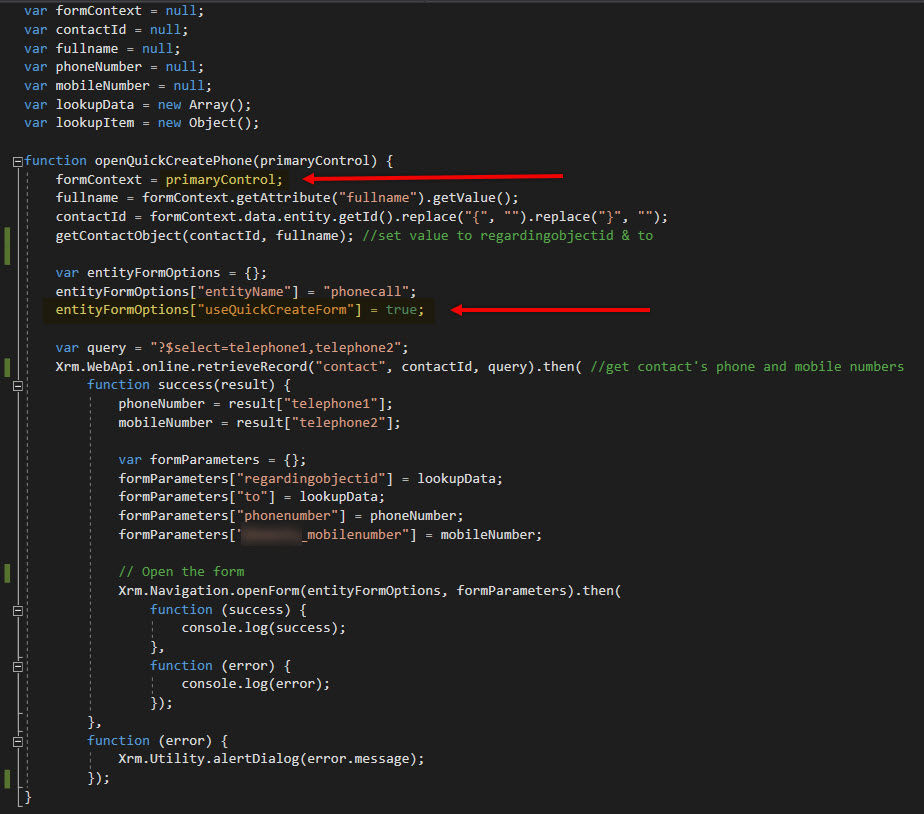
Your result:

 Lyrio Cristall