Why You Should Avoid Adding Full Tables to Your Dataverse Solutions

When working with Dataverse solutions, it’s easy to fall into the habit of adding entire tables “just to be safe.” However, this practice can introduce unintended side effects, some of which only surface later as dependency issues during deployments.

Why Adding Only Changed Components Matters

When Microsoft introduces updates to Dataverse, such as new columns or relationships, those components are automatically pulled into any solution that contains the full table objects. This can lead to unexpected dependencies, even if your team didn’t explicitly change anything.

A Common Dependency Pitfall

One common scenario occurs when Microsoft adds a new relationship between Case and Contact.

If your solution includes the full Contact table but does not include the Case table, Dataverse will still bring in the new relationship metadata. During import, this results in a dependency error because the solution now references Case, even though Case itself isn’t part of the solution.

These issues are often confusing, time-consuming to troubleshoot, and completely avoidable.

The Fix, and the Best Practice

To resolve the issue, remove the Account and Contact tables from your solution and re-add only the specific components that were changed and actually required. Do this every time you have to add new components in the solution.

This approach ensures:

  • Cleaner and smaller solutions
  • Fewer unintended dependencies
  • Safer deployments across environments
  • Less risk from future Microsoft platform updates

It’s important to note that this best practice applies to all tables, not just Account and Contact.

Key Takeaway

✅ Add only what you change
🚫 Avoid adding full table objects unless absolutely necessary

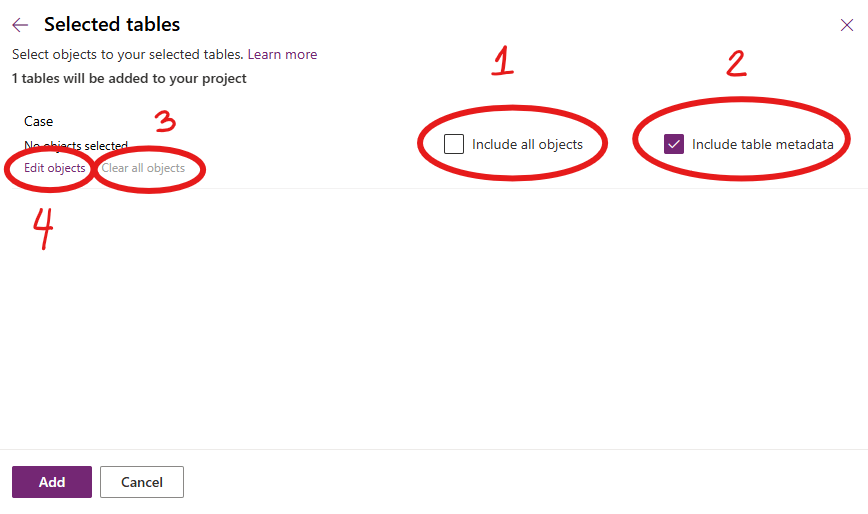
The How?

1. Ensure “include all objects” is unchecked
2. Ensure “include table metadata” is checked
3. Clear all objects (Important!)
4. Edit objects to select only the item you want to be included in the solution
Following this principle keeps our solutions stable, predictable, and easier to maintain, especially as Dataverse continues to evolve. Please don’t dig in or take shortcuts here; decisions like this have a ripple effect that impacts the entire team.

Power Apps Community Plan has been rebranded as the Power Apps Developer Plan

If you have not heard yet, you can actually have a free development environment to build and test with Power Apps, Power Automate, and Microsoft Dataverse.

In the Microsoft Learn article, it explains that this plan enables you to:

  • Create apps and flows without writing code, with full-featured Power Apps and Power Automate development tools. Easily share and collaborate on these solutions with others.
  • Connect to any data source by using 400+ out of the box connectors or by creating your own custom connectors.
  • Use a fully managed, scalable data platform with Dataverse, including support for common business application actions. Use out-of-the-box common tables or build your own data schema.
  • Export the solutions you create in your developer environment, and publish them on Microsoft AppSource so your customers can test-drive them.

For more information, please check out Microsoft Learn. Enjoy learning!

Improved Custom Recurring Tasks in Dataverse

Hi there! I have been receiving a few emails regarding my previous post about Custom Recurring Tasks. I read my post and realized that there are missing pieces in there. I probably left it like that to invite discussions and questions. Well, after more than a year, here we are and we got a few inquiries on the solution.

I tested the recurring feature of appointments and use that concept to re-create my Recurring Tasks solution.

I used the same UI section but I kind of optimized the Power Automate. Instead of 2 cloud flows, I kept it to one and use SWITCH to separate the daily vs weekly reoccurrence.

Here is how it looks now:

And to save you time, you can explore the solution by downloading it here. Have fun!

Features of Queues (When to use and recommend Queues vs Activities?)

Activities is a list of all activity types such as Email, Phone Call, Task, Appointment, Fax, Letter, etc.

Queues is a place where you list both activities and cases in the same view.

Depending on business needs, you can recommend either one to manage all action items recorded in CRM. Some business users, they prefer looking into separate views, however, some businesses have multiple teams and it will be beneficial for them to use queues instead.

Here are the most important information you need to understand and know when considering Queues vs Activities.

QUEUES FEATURES

  • It is required to setup a Team to use Queues. This way, you can easily manage the members’ action items and their security role.
  • The activities and cases inside a queue is called a queue item.
  • Users can pick a queue item as needed.
  • Picking a queue item updates the Worked By field/column. This also updates the record’s owner field.
  • Users can route a queue item to another Queue or User.
  • Users cannot route a queue item to a user who is not a member of the Queue that owns the queue item.
  • A queue item can be delegated to another user who is not member of team by assigning the specific activity or case (just like any other records in CRM).
  • Releasing a picked queue item will automatically be routed back to the Queue even if you have assigned the activity or case to anotehr user. (Worked By will be empty / Owner == Team)
  • When displaying an Activity Status in queue, it will be a separate column per activity type unless you add a custom script. This applies with other fields like Due Date, Priority and other important fields. Thus, heading to a separate view for Activities and Cases are helpful.

Activities will stay even if the business chose to use Queues. There are certain users that does not work on Cases which means, Activity Views are good enough for them to manage their action items.

I hope this is helpful. Cheers!

Recover recently deleted Dynamics 365 environment

Did you know that you can still recover deleted environment within 7 days of deletion by using Power Apps cdmlet Recover-AdminPowerAppEnvironment?

Learn more about the Powershell cmdlets here. It is in preview mode but users with a valid Power Apps license can perform the operations in these cmdlets. Note that you can only perform these with the resources you have access to. More information here.

Note: Environments that can be restored are environments deleted by an administrator and not those deleted by the system due to license expiration and other scenarios.

Let me know how it goes on your end. Enjoy!

Built-in Custom Controls in Dynamics 365

Did you know that you can easily configure fields to a really cool custom control in Dynamics 365 without any sort of coding? Check this out!

You can simply convert a Single Line of Text or Currency/Number fields to an Auto Complete, Business Card, Slider, Knob or a Star Rating control just through configuration. Here’s how:

Navigate to Field Properties and add the custom control of your choice. Depending on what can meet your business requirements, you can set up each of the fields to spice up the user experience.

Cool eh?! Try it now. Have fun!

Welcome!

This blog site is dedicated to the next generation developers and architects who are passionate about learning the Dynamics 365, Azure, and the Power Platform, including Power BI, Power Automate, and Power Apps.

My mission is to pass on my knowledge and share real-world experiences to inspire and empower others.

I am here to share tips and tricks, design ideas, troubleshooting techniques, and best practices to help you in your journey on becoming solution experts.

Let’s continue to make the world a better place. 😊

Where to start?

Whether you are someone who wants to jump-start your career, or someone who wants to become certified, or an individual who just wants to grow their knowledge through in-depth learning and gain more confidence on Power Platform, Azure or Dynamics 365 on your own pace, here are the best place for you to go and learn.

Microsoft Learn – Microsoft has launched an improved learning portal a few years back and has published great content to help developers, architects, and IT administrators of all backgrounds to help them achieve more. I remember having to work on Azure or Dynamics CRM back in the day and cannot find any site to learn real-world examples to help me out. No worries because you will find a lot of helpful content now as Microsoft is committed to empowering everyone and has given us guided learning on all of their platform products and services that we can learn at our own pace. You can now explore their Learning Path to learn specific modules of your choice.

Udemy – This is my go-to place in learning more about Microsoft products from a different perspective. Tons of content creator shared a very detailed tutorial and excellent content to help you either pass your Microsoft certification or learn tips and tricks from their real-world experiences.

Enjoy learning and continue to inspire. If you know other learning sites and want to help out the community, please feel free to share it in the comments box below. 🙂

Create a website or blog at WordPress.com

Up ↑